
SLOTSTAKE Game Download Latest Version for Android in Pakistan 2026
Today
11MB
1.8
Android
4432
Description
Looking for a reliable Android gaming platform? SLOTSTAKE Game offers simple access today. It supports modern Android devices with regular updates and smoother performance. This guide explains installation, registration, features, and important account management steps. You will also learn responsible usage tips before getting started.
Many users in Pakistan prefer applications with easy navigation and familiar payment methods. This article explains the latest Android app in Pakistan using simple language. It covers download requirements, available game categories, bonuses, referrals, deposits, and withdrawals. Every section focuses on helping users understand the platform clearly. The information remains balanced, practical, and easy to follow.
What is SLOTSTAKE Game?
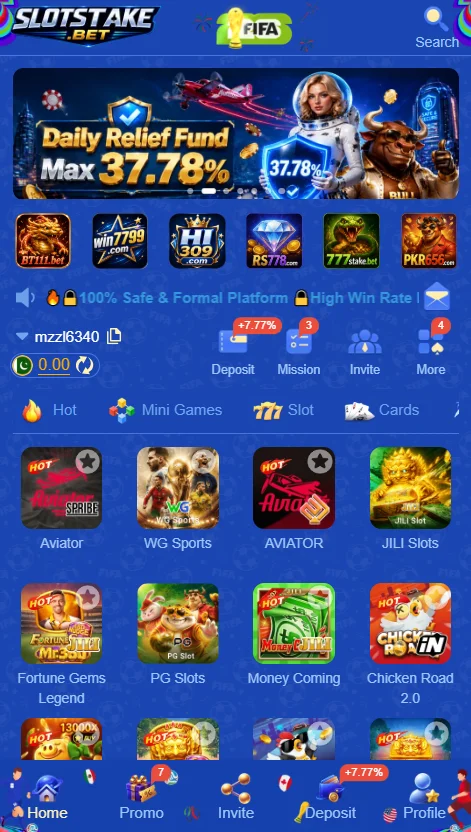
SLOTSTAKE Game is an Android-based online gaming platform that allows registered users to access multiple digital game categories through one application. It includes account registration, wallet management, promotional offers, referral features, and payment support using methods like JazzCash and Easypaisa. Similar to Play4Tune Game, the app receives regular updates to improve compatibility, security, stability, and the overall user experience on supported Android devices.
Features of SLOTSTAKE Game
Simple User Interface
The application offers a clean layout with clearly organized menus throughout. New users quickly understand navigation without needing lengthy instructions or guidance. Buttons remain visible across different screen sizes for better accessibility. Important account options stay available from the main dashboard anytime. This improves convenience during everyday use.
Fast Account Access
Registration follows a straightforward process requiring only essential account information initially. Secure login keeps user accounts protected through authentication procedures. Password recovery options help restore account access when necessary. Returning users can sign in within only a few simple steps. This saves valuable time daily.
Multiple Payment Options
Several supported payment methods simplify wallet management for eligible users nationwide. Popular services include JazzCash and Easypaisa for convenient transactions. Deposit records remain accessible within the account history section. Withdrawal requests follow platform verification procedures before processing successfully. This creates a smoother financial experience.
Regular Version Updates
Developers release updates to improve compatibility across newer Android smartphones consistently. Performance enhancements reduce application errors during everyday operation and usage. Security improvements help strengthen account protection against potential vulnerabilities. Updated versions often introduce interface refinements and useful optimizations. Users benefit from improved overall stability.
Smooth Performance
The application performs efficiently on many supported Android device configurations today. Optimized coding helps reduce loading delays during normal platform usage. Stable performance creates a better overall user experience every session. Responsive controls improve navigation between available application sections quickly. Resource management remains efficient throughout operation.
Secure Account Controls
Security settings provide better control over personal account management options available. Verification procedures help reduce unauthorized account access attempts significantly. Users should create strong passwords for improved protection every time. Login activity remains easier to monitor through available account settings. Responsible practices improve overall security.
Organized Wallet Management
The wallet section displays balances and transaction records in one location. Users can review deposits and withdrawals whenever necessary through history. Clear organization helps reduce confusion during financial management activities. Account information stays easier to understand with structured records available. This supports better transparency.
Device Compatibility
The application supports many modern Android smartphones with compatible operating systems installed. Installation remains straightforward across different screen sizes and hardware specifications. Regular optimization improves compatibility with newer software versions continuously. Most supported devices provide stable performance after successful installation completes. Users enjoy consistent accessibility.
Available Game Categories
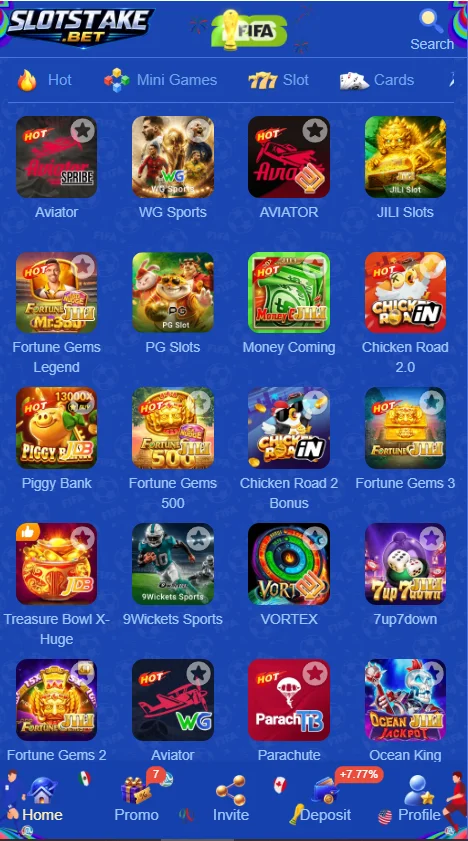
- Slot Games – Includes different themed slot-style games with varying gameplay mechanics.
- Card Games – Features digital card-based options requiring strategy and decision-making.
- Fishing Games – Interactive arcade-style games with colorful graphics and simple controls.
- Sports Games – Covers sports-related digital entertainment within the application.
- Arcade Games – Quick-play options designed for short gaming sessions.
- Puzzle Games – Encourages logical thinking and problem-solving through engaging challenges.
- Lucky Draw Activities – Limited-time promotional events with participation rules.
- Seasonal Events – Special campaigns available during selected promotional periods.
How to Get Started on SLOTSTAKE App
SLOTSTAKE Game Download Process
- Download the latest version from the official platform or trusted source like APK Online.
- Allow installation from trusted sources if your Android device requests permission.
- Open the downloaded APK file.
- Complete the installation process.
- Launch the application after installation finishes.
- Check for updates before using the app.
Registration and Login Process
- Open the installed application.
- Select the Register option.
- Enter your mobile number and required information.
- Create a secure password.
- Verify your account if required.
- Log in using your registered credentials.
- Complete your profile if requested.
How to Manage Funds in SLOTSTAKE Game?
Deposit Funds
- Sign into your account.
- Open the Wallet section.
- Choose the Deposit option.
- Select JazzCash, Easypaisa, or another supported payment method.
- Enter the deposit amount.
- Confirm the transaction.
- Wait for balance confirmation.
Withdraw Rewards
- Open your Wallet page.
- Select Withdraw.
- Enter your withdrawal amount.
- Choose your preferred payment method.
- Complete any verification requirements.
- Submit your request.
- Wait until processing is completed according to platform policies.
In-App Rewards & Bonuses
- Welcome Bonus – Available for eligible new accounts after completing required conditions.
- Daily Login Rewards – Regular login may unlock small promotional benefits according to platform rules.
- Referral Bonus – Rewards are provided after eligible referral conditions are successfully completed.
- Seasonal Promotions – Limited-time campaigns may offer additional bonuses during special events.
- Deposit Promotions – Certain deposits may qualify for promotional offers when requirements are fulfilled.
- Activity Rewards – Completing selected in-app activities may unlock bonus opportunities.
- Event Challenges – Temporary challenges may include additional promotional incentives.
- Loyalty Rewards – Long-term active users may receive benefits based on participation policies.
Why Choose This Android Game in Pakistan?
The application supports convenient payment methods commonly used throughout Pakistan today. Users can manage accounts through an organized interface without unnecessary complications. Regular updates improve compatibility across many modern Android smartphone models. Clear navigation helps beginners understand important features more comfortably. Local accessibility makes everyday platform usage simpler for eligible users.
The platform also focuses on stable performance during normal Android device operation. Straightforward registration reduces unnecessary complexity for first-time account creation. Multiple game categories provide different entertainment choices within one application. Wallet management remains organized through clear transaction history and account records. Responsible users can enjoy a convenient digital gaming experience.
Referral Program Guide
- Register and verify your account before accessing referral features.
- Open the Referral section from your account dashboard.
- Copy your personal referral link or invitation code.
- Share the referral link with friends through messaging apps or social media.
- Ensure new users register using your referral code.
- Ask referrals to complete any required verification steps.
- Eligible rewards are credited only after all platform conditions are fulfilled.
- Monitor referral progress from the referral tracking section.
- Read current referral terms because promotional conditions may change.
Tips to Use the App Responsibly
Tip
Explanation
Set a Budget
Decide your spending limit before using the application.
Manage Time
Schedule gaming sessions and avoid excessive daily usage.
Read the Rules
Understand each game before participating.
Protect Your Account
Use a strong password and never share login details.
Track Transactions
Review deposits and withdrawals regularly for accuracy.
Take Regular Breaks
Balance gaming with work, study, and personal responsibilities.
Pros and Cons
Pros
- Easy Android installation process.
- Supports JazzCash and Easypaisa.
- Clean and beginner-friendly interface.
- Multiple game categories available.
- Regular updates improve performance.
Cons
- Android version compatibility may vary.
- Internet connection is required.
- Verification may delay some transactions.
- Promotional offers change periodically.
- APK downloads from unknown sources may present security risks.
Personal Experience
After testing the application on a compatible Android device, I found the interface clean, responsive, and straightforward to navigate. Registration required only basic information, while account verification followed a simple process. The wallet section remained organized, making transaction history easy to review. Performance stayed stable during normal use without significant slowdowns on a mid-range smartphone. Security options such as password protection and account verification added confidence when managing the account. Promotional activities were clearly explained with visible conditions instead of unrealistic promises. Overall, the application delivered a practical user experience suitable for Android users who value organized navigation, stable performance, and transparent account management.
Is SLOTSTAKE APK Safe to Download?
Downloading the SLOTSTAKE APK should only be done from trusted or official sources to reduce security risks. APK files obtained from unknown websites may contain modified software or harmful code. Users should protect their accounts with strong passwords, complete available verification steps, and keep the application updated. Responsible usage and careful downloading practices help improve overall account safety.
FAQs
Most Android devices require moderate free storage space for installation and future updates.
A compatible Android smartphone, stable internet connection, and sufficient storage are generally required.
Download time depends on your internet speed and the APK file size.
Installation problems may result from insufficient storage, incompatible Android versions, disabled installation permissions, or interrupted downloads.
If supported by your account and region, both payment methods may be available for eligible transactions.
Yes. The latest version usually includes security improvements, bug fixes, compatibility updates, and better overall performance.
Conclusion
SLOTSTAKE Game provides Android users with a structured online gaming platform featuring organized navigation and practical account management. The application supports modern payment methods, regular updates, and multiple entertainment categories. Users can easily complete registration, manage funds, and review transaction records within one interface. Understanding platform policies helps create a smoother overall experience. Responsible usage remains important for every account holder.
Before installing any APK, verify the download source and keep your application updated regularly. Review all promotional terms carefully before participating in available activities or referral programs. Manage your budget wisely and protect your account using strong security practices. Following these recommendations helps improve safety, convenience, and long-term usability. This balanced approach allows users to make informed decisions while using the application.
Download links
How to install SLOTSTAKE Game Download Latest Version for Android in Pakistan 2026 APK?
1. Tap the downloaded SLOTSTAKE Game Download Latest Version for Android in Pakistan 2026 APK file.
2. Touch install.
3. Follow the steps on the screen.